No updates on anything this time, im just in a library.
its the first of the month, idk if its that time again lmao
every once in a while i get the motivation to just do everything, and then a heavy fucking boulder sets on me and i can barely get up from my bed
2 months until the year is over, my birthday came and went away, i didnt even realize it has passed lmao fucking hell im getting old
anyways fuck it we ball
2026-09-30
2026-09-25
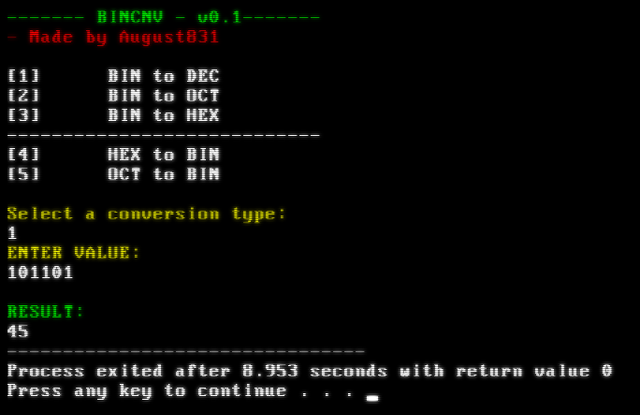
BINCNV-v0.1
we were asked to just translate from a binary number to a decimal number using pen and paper with the formula that the professor had taught us in uni
but i got fucking bored and decided to make a full on converter for binary specificially made for this homework lmao
as you can see im still working on it, but the first conversion is done.
also CHECK THIS OUT!!!!!!
i never knew you could style the windows cmd so nicely, it has a little CRT effect on it and i changed the font to one that looks like the good old DOS font
now i feel like a genuine larper, great lmao
anyways, ill keep working on this shit, ive had some problems with the compiler and this fuckass IDE that the uni is forcing us to use
apparently i was using gcc 4.5 or some shit, which is ancient as fuck. so i had to do the mingw bullshit all over so i could work with strings (specifically the "to_string" thing).
ill just go to sleep now gn
2026-09-16
guestbook!!
i have attempted times and times to make a guest book myself but then i realised i need a fucking server,
so heres a third party guestbook that you can use to talk shit to me.
the top of the site now has a "guestbook" button, go ahead get it off your chest lmao
not a single fucking censor on that shit, go ham
I HAVE SPECIFIED IN THAT SITE AS WELL BUT ILL SAY IT HERE TOO:
- USE A VPN BEFORE YOU SEND THE MESSAGE !!!
- DO NOT SHARE YOUR REAL NAME !!!
because i can see the IP of where the message was sent from which i FUCKING HATE. i dont want to see SHIT. and theres no option to hide everything.
i want as much freedom as for me as for everyone. PLEASE REFRESH THE GUESTBOOK PAGE AFTER YOU OPEN A VPN JUST TO BE SURE.
2026-09-15
fucked up in the crib studying computers
i am studying in a uni now, first of all let me say: FUCK this outdated education system and FUCK the scammy predatory ass policies they have to vacuum money out of the students pockets.
ill fucking obliterate everyone in the class with my mind
tho theres one autistic nigga in the class, im so fkn cooked man.
he probably makes operating systems in his free time for fun.
ill fkn show him if an autistic prodigy or a stubborn fucking retard with deep engraved self hatred and perfectionism will be the victor.
i absolutely fucking hate competition but he asked for it because his parents decided to keep the baby
and im not a pussy to turn down a challenge LMFAO
im having fun here
2026-08-14
New track: at the liqa sto
some hyperpop bullshit, idk
found a good ass vocal sample on preset share and i had to use it, here the fk it is, i like it, maybe ill do more of this
i fkn hate trap style drums but in this track it fit so well that i had no choice but to put trap drums on it,
in fact i absolutely hate "beat" type beats. you know what i fkn mean, those generic fuckass uncreative slop made by EVERY SINGLE PRODUCER ON THIS FUCKING EARTH
like cant you think of something else rather than making "lil dih" type beats? GOD I FKN HATE RAP BEATS OR HIP HOP BEATS, if youre gonna do shit like this then at least be creative, PLEASE.
on top of all, the audacity to even record that shit and put it on your story like youre so proud of making ABSOLUTE DOGSHIT, and then they act gangsta or whatever.
nigga kill yourself for everyones sake.
2026-08-12
New track: bGV0IG1lIGJlIG15c2VsZg==
something i made in a few hours,
sample that i used for vocals is "parasite" by cloudyfield
2026-08-11
HELLO HAROLD
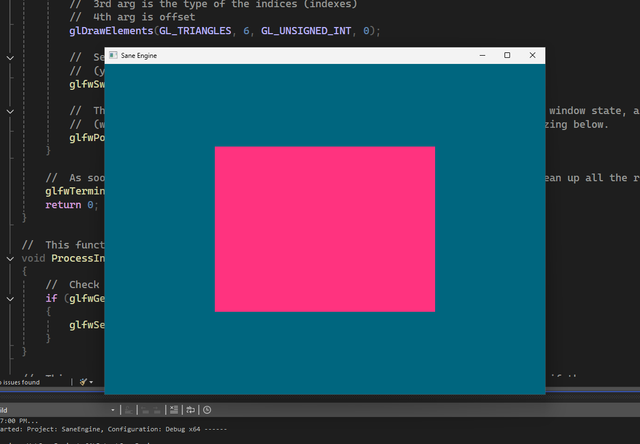
I FINALLY GOT A SHAPE ON MY FUCKING WINDOW
Sane engine is coming to life slowly, right now i just have a quad made out of two traingles,
WEEKS OF BLOOD SWEAT AND MORE SWEAT AND THEN TEARS FINALLY GAVE ITS' FRUITS OF LABOR
if you ask me what im trying to do with C++ and opengl suddenly, ill say i dont fucking know, but its nice to actually write code for once instead of just dragging the mouse around in unreal and blueprints
i stream my progress on twitch because thats the only place that has some people actually clicking, i fucking hate twitch but i do it anyways
i stream for myself, because im able to sit for hours when i feel like im talking to someone, and i understand shit better when i talk to myself
idfk what im saying, anyways
HELLO TRAINGLE + QUAD IS DONE MOTHERFUCKER AAAAAAAAAAAAAAAAAAAAAAAAAAAAAAAAAAAAAAAAAAAAAAAAAAAAAAAAAAAAAAAAAAAAAAAAAAAAAAAAAAAAA
heres the source code idfk what anyone will do with it but it has good comments and explanantions imo
#include <glad/glad.h>
#include <GLFW/glfw3.h>
#include <iostream>


//	We need identifiers for functions just like how we need them with variables, thats why these two lines are here.
void framebuffer_size_callback(GLFWwindow* window, int width, int height);
void ProcessInput(GLFWwindow* window);
void PrintOpenGLInfo();

//	A constant is a read-only variable, so the program cant change it.
//	SETTINGS
const unsigned int SCR_WIDTH = 800;
const unsigned int SCR_HEIGHT = 600;

//	We make a read-only var of type char, because OpenGL will be compiling the shader at run-time.
//	first we set the version of GLSL as 3.3 just like our OpenGL ver and we set the core profile.
//	"in" means input, and in this case our input variable is the vec3 var called aPos, and we set the location of this var as 0 using layout (location = 0)
//	gl_Position is the output of our vertex shader, so whatever we set it, that will be our output.
//	in this case we are straight up shooting the vec3 input into the output.
//	Vertex shader source code
const char* vertexShaderSource = "#version 330 core\n"
"layout (location = 0) in vec3 aPos;\n"
"void main()\n"
"{\n"
"gl_Position = vec4(aPos.x, aPos.y, aPos.z, 1.0);\n"
"}\0";

//	Frag shader only requires an output, we can declare output values with "out", in this case, of type vec4 named FragColor.
//	Fragment shader source code
const char* fragmentShaderSource = "#version 330 core\n"
"out vec4 FragColor;\n"
"void main()\n"
"{\n"
"FragColor = vec4(1.0f, 0.2f, 0.5f, 1.0f);\n"
"}\n";

//	Right now, these vertices are stored on the CPU, we need to transfer them to our GPU.
//	Theres a variable called "GLfloat" which is the OpenGL ver of a float, but i dont find a reason why i should complicate shit.
float vertices[] =
{
//	  x		 y	   z
	 0.5f, 0.5f, 0.0f,	//	top right point
	 0.5f, -0.5f, 0.0f,	//	bottom right point
	-0.5f, -0.5f, 0.0f,	//	bottom left point
	-0.5f,  0.5f, 0.0f	//	top left point
};

//	indices means indexes
unsigned int indices[] =
{
	0, 1, 3,	//	1st tri
	1, 2, 3		//	2nd tri
};


int main()
{
	glfwInit();
	//	We set the version of GLFW as 3.3 since that is the ver we are using
	glfwWindowHint(GLFW_CONTEXT_VERSION_MAJOR, 3);
	glfwWindowHint(GLFW_CONTEXT_VERSION_MINOR, 3);

	//	We set the profile to core_profile which is the more flexible one rather than the
	//	deprecated immediate profile.
	glfwWindowHint(GLFW_OPENGL_PROFILE, GLFW_OPENGL_CORE_PROFILE);

	// The following line is for MacOS, uncomment if you are on mac (ew)
	// glfwWindowHint(GLFW_OPENGL_FORWARD_COMPAT, GL_TRUE);

	// we create a glfw window object called 'window' and set its' width height and name
	GLFWwindow* window = glfwCreateWindow(SCR_WIDTH, SCR_HEIGHT, "Sane Engine", NULL, NULL);

	// Some error handling
	if (window == NULL)
	{
		std::cout << "Failed to create GLFW window" << std::endl;
		glfwTerminate();
		return -1;
	}

	// Make the context of our window the main context on the current thread
	// (yet to be understood)
	glfwMakeContextCurrent(window);
	//	Set appropriate size for the framebuffer according to the created window, we run this function everytime we resize the window as well.
	//	We run this once when the window is created to make sure the framebuffer is the same size as the glfw window
	glfwSetFramebufferSizeCallback(window, framebuffer_size_callback);

	//	Initialize/Prepare GLAD before calling any OpenGL function
	//	(since GLAD manages the function pointers of OpenGL)
	//	glfwGetProcAddress gives us a correct OS-based function and we feed that into GLAD to load OpenGL func pointers
	if (!gladLoadGLLoader((GLADloadproc)glfwGetProcAddress))
	{
		std::cout << "Failed to initialize GLAD" << std::endl;
		return -1;
	}

	//	get info about OpenGL and print it out
	//	This function doesnt exist in the book, this was added thanks to Mike Shah on yt
	PrintOpenGLInfo();


	//	VERTEX SHADER ::

	//	We create the shader object referencing a unique ID.
	unsigned int vertexShader = glCreateShader(GL_VERTEX_SHADER);

	//	Attach the shader object to the shader source
	//	First parameter of glShaderSource is the shader object we want to compile, second arg is how many strings we are passing in -which apparently is 1 string-
	//	Third arg is the shader source code we want to attach to the shader object, and the fourth arg can be ignored for now.
	glShaderSource(vertexShader, 1, &vertexShaderSource, NULL);

	//	We finally compile the shader object that we attached a source code to it earlier.
	glCompileShader(vertexShader);

	//	Check for errors::
	//	define an int to indicate success
	int success;
	char infoLog[512];

	//	glGetShaderiv — Returns a parameter from a shader object
	//	1st arg is the shader object, 2nd arg is the status we want to return, 3rd arg is (yet to be understood)
	glGetShaderiv(vertexShader, GL_COMPILE_STATUS, &success);
	if (!success)
	{
		//	Returns the information log for a shader object
		//	1st arg is the shader, 2nd is maxLength aka buffer size for our info log, 3rd arg returns the length of the string in infoLog
		//	4th is the character arrays to return the infoLog into aka the target to write to.
		glGetShaderInfoLog(vertexShader, 512, NULL, infoLog);
		std::cout << "ERROR::SHADER::VERTEX::COMPILATION_FAILED\n" << infoLog << std::endl;
	}


	//	FRAGMENT SHADER ::

	//	We create the shader object referencing a unique ID.
	unsigned int fragmentShader = glCreateShader(GL_FRAGMENT_SHADER);

	//	Attach the shader object to the shader source
	//	First parameter of glShaderSource is the shader object we want to compile, second arg is how many strings we are passing in -which apparently is 1 string-
	//	Third arg is the shader source code we want to attach to the shader object, and the fourth arg can be ignored for now.
	glShaderSource(fragmentShader, 1, &fragmentShaderSource, NULL);

	//	We finally compile the shader object that we attached a source code to it earlier.
	glCompileShader(fragmentShader);

	//	Check for compilation errors for the fragment shader.
	//	glGetShaderiv — Returns a parameter from a shader object
	//	1st arg is the shader object, 2nd arg is the status we want to return, 3rd arg is (yet to be understood)
	glGetShaderiv(fragmentShader, GL_COMPILE_STATUS, &success);
	if (!success)
	{
		//	Returns the information log for a shader object
		//	1st arg is the shader, 2nd is maxLength aka buffer size for our info log, 3rd arg returns the length of the string in infoLog
		//	4th is the character arrays to return the infoLog into aka the target to write to.
		glGetShaderInfoLog(fragmentShader, 512, NULL, infoLog);
		std::cout << "ERROR::SHADER::FRAGMENT::COMPILATION_FAILED\n" << infoLog << std::endl;
	}

	//	SHADER PROGRAM ::

	//	Now that we have a vertex and fragment shader, we need to link both shader objects into a "shader program" and activate it so that we can use for rendering.
	//	when linking the shaders into a program, it links the outputs of one shader into the next shaders' inputs.
	//	so the linked shaders have to have matching ins and outs.

	//	Creation of the shader program object
	//	glCreateProgram creates a program, duh, and returns the ID of the program obj it created.
	unsigned int shaderProgram = glCreateProgram();

	//	we need to attach the shaders we compiled (vertex and fragment) to the shaderProgram we just created.
	glAttachShader(shaderProgram, vertexShader);
	glAttachShader(shaderProgram, fragmentShader);

	//	After we have attached the shaders to the shaderProgram, we need to link them using the following:
	glLinkProgram(shaderProgram);

	//	Checking for errors
	//	Since we arent checking a shader for errors, instead we are checking a program.
	//	So we use glGetProgramiv instead of glGetShaderiv that we used before,
	//	same thing with glGetShaderInfoLog that we used previously, now we need to use glGetProgramInfoLog.
	glGetProgramiv(shaderProgram, GL_LINK_STATUS, &success);
	if (!success)
	{
		glGetShaderInfoLog(shaderProgram, 512, NULL, infoLog);
		std::cout << "ERROR::PROGRAM::SHADER::LINKING_FAILED\n" << infoLog << std::endl;
	}

	//	After we created the program and made sure the linking is working properly, we need to activate the program object.
	//	We can activate the shaderProgram by using it as an argument in glUseProgram function.
	//	Every shader and rendering call after glUseProgram will now use this program object (and thus the shaders).
	glUseProgram(shaderProgram);

	//	Once we have both shaders linked inside the shader program, we no longer need the vertexShader and fragmentShader
	//	To make some space, we delete them. Because they are already in the shader program itself.
	glDeleteShader(vertexShader);
	glDeleteShader(fragmentShader);

	//	TODO:	EXPLAIN EBO Element array buffer (page 38)


	//	decleration of our VBO, VAO & EBO, its of type int because it has a unique ID we need to pass in later.
	unsigned int VBO, VAO, EBO;

	//	glGenVertexArrays does what it seems like it does, instead of a buffer we create something that isnt a buffer (im sorry)
	glGenVertexArrays(1, &VAO);

	//	glGenBuffers allows us to generate a buffer for out vertex buffer objects(VBO)
	//	Buffers have unique IDs, as well as VBO has a unique ID so we pass that into glGenBuffers to generate one.
	glGenBuffers(1, &VBO);


	//	generate another buffer for EBO
	glGenBuffers(1, &EBO);


	//	Unlike a Buffer, vertex arrays doesnt need specification for its type, its only one kind.
	glBindVertexArray(VAO);


	//	Since we want a VBO buffer, we need to bind the generated buffer to the appropriate type.
	//	After the generation of the needed buffer, we need to bind a type to it, we do this by writing the following:
	glBindBuffer(GL_ARRAY_BUFFER, VBO);

	//	Since VBO is GL_ARRAY_BUFFER now, we can fill this GL_ARRAY_BUFFER with the appropriate data. We do that using glBufferData.
	//	We feed the previously defined vertex data into the buffer's memory.
	//	First argument is the target buffer type, second arg is the size of the data we want to copy (in bytes), third arg is the data itself, fourth arg specifies how should the GPU manage the data
	//	Theres 3 types of ways the GPU manages the data; STREAM, STATIC and DYNAMIC draw.
	//	in this case we are using a STATIC draw, because we set the data once and we want to use it many times.
	glBufferData(GL_ARRAY_BUFFER, sizeof(vertices), vertices, GL_STATIC_DRAW);


	//	TODO: EXPLAIN
	glBindBuffer(GL_ELEMENT_ARRAY_BUFFER, EBO);


	//	TODO: EXPLAIN
	glBufferData(GL_ELEMENT_ARRAY_BUFFER, sizeof(indices), indices, GL_STATIC_DRAW);


	//	So far, we have sent the data we need to the GPU, and taught the GPU how it should process the data with the help of our vertex and fragment shaders.
	//	But we still need to make OpenGL understand what we want to do.
	//	We want to let OpenGL process this data in memory, and tell it how to connect the vertex data and its' attributes. (yet to be understood fully)

	//	glVertexAttribPointer, we can tell OpenGL how it should interpret the vertex data (per vertex attribute)
	//	thanks to this func, we can set the vertex attributes pointers
	//	Our VBO holds 3 floats worth of data for each vertex point we specified before, since we set the location layout as 0
	//	then we tell glVertexAttribPointer func that we start at 0 (first arg), then we have to tell the function how many attributes we are about to specify,
	//	Since our vertices uses 3D dimensions then we use Vec3 which consists of 3 floats therefore 3 is our second arg.
	//	after that we tell what kind of data it is -> arg3 GL_FLOAT
	//	the 5th arg, is the space between each vertex attribute aka the stride, since we have 3 values for each vertex and each vertex is a float
	//	then we have to calculate the space needed for a single vertex, so we can tell how big of a step this function should take for the next vertex
	//	therefore we use 3 * sizeof(float) to calculate the space needed, in bytes. (a float occupies 4 bytes, and since we have 3 floats, then we need 12 bytes for each vertex = a stride)
	glVertexAttribPointer(0, 3, GL_FLOAT, GL_FALSE, 3 * sizeof(float), (void*)0);

	//	vertex attributes are disabled by default thats why we enable them
	//	0 is the index aka location of the attrib array to enable
	glEnableVertexAttribArray(0);


	//	UNBIND BUFFERS AND ARRAYS
	//	Now that we configured and modified our buffers and shit, we need to unbind it so we can use it later (in the render loop)
	glBindBuffer(GL_ARRAY_BUFFER, 0);
	glBindVertexArray(0);

	//	DONT UNBIND EBO (IMPIORTANT FOR SOME REASONS, IM SORRY IDK)
	//glBindBuffer(GL_ELEMENT_ARRAY_BUFFER, 0);


	//	Right now, if you run this without the while loop, aka the render loop, it will just draw a single image and then quit immediately.
	//	with this render loop we make sure that it keeps drawing and handling user input until it is specifically told to stop.
	//	glfwWindowShouldClose checks if the GLFW window should close with each iteration of our render loop, duh.
	//	Each iteration of a render loop is known as a "frame".

	//	RENDER LOOP::


	while (!glfwWindowShouldClose(window))
	{
		//	Check for inputs
		ProcessInput(window);

		//	Clean up the color of the frame to render the next frame replacing it with the specified RGBA in glClearColor.
		//	Not doing a glClear will result in vestiges of the previous frame to be present in the current frame, which might look cool in the future actually.
		glClearColor(0.0f, 0.4f, 0.5f, 1.0f);

		//	Set the state as glClearColor, and use that state in glClear, this is how all of OpenGL works. A big fucking state machine.
		//	TODO: (yet to be understood)
		glClear(GL_COLOR_BUFFER_BIT);


		//	use our shader program when we want to render an object
		glUseProgram(shaderProgram);

		//	Focus on the VAO that we modified before reaching the render loop
		glBindVertexArray(VAO);

		//	1st arg specifies what kind of primitive (shape) we want to draw,
		//	2nd arg is the amount of points we want to draw in total
		//	3rd arg is the type of the indices (indexes)
		//	4th arg is offset
		glDrawElements(GL_TRIANGLES, 6, GL_UNSIGNED_INT, 0);

		//	See page 22-23 in Learn OpenGL by Joey de Vries
		//	(yet to be understood)
		glfwSwapBuffers(window);

		//	This function checks if any events are triggered -like inputs-, updates the window state, and calls the corressponding functions.
		//	(which we can specify via callback methods like we did with the window resizing below.
		glfwPollEvents();
	}

	//	As soon as the render loop is complete it will terminate the glfw window and clean up all the resources to exit properly.
	glfwTerminate();
	return 0;
}

//	This function will be processing our inputs
void ProcessInput(GLFWwindow* window)
{
	//	Check if the ESCAPE key is PRESSed, if so then close the window.
	if (glfwGetKey(window, GLFW_KEY_ESCAPE) == GLFW_PRESS)
	{
		glfwSetWindowShouldClose(window, true);
	}
}

//	This ensures that the viewport gets adjusted according to the window dimensions, so if the user resizes the window, itll fit itself inside there
//	"framebuffer_size_callback" takes a GLFWwindow object and two ints that indicates the new window dimensions.
//	This gets called everytime the window changes size. It also gets called when the window is first displayed.
void framebuffer_size_callback(GLFWwindow* window, int width, int height)
{
	//	Lastly, we tell OpenGL the dimensions of the viewport size, which is equal to the GLFW window size,
	//	and where it should be displayed.
	//	The first two values are the pixel locations of the lower left corner of the window, apparently thats the pivot point for created windows.
	//	Note that processed coordinates in OpenGL are between -1 and 1 so we effectively map from the range (-1 to 1) to (0, 800) and (0, 600).
	glViewport(0, 0, width, height);

	//	We register this function so GLFW would call it on every window resize
	glfwSetFramebufferSizeCallback(window, framebuffer_size_callback);
}

void PrintOpenGLInfo()
{
	std::cout << "Vendor: " << glGetString(GL_VENDOR) << std::endl;
	std::cout << "Renderer: " << glGetString(GL_RENDERER) << std::endl;
	std::cout << "Version: " << glGetString(GL_VERSION) << std::endl;
	std::cout << "Shading Language: " << glGetString(GL_SHADING_LANGUAGE_VERSION) << std::endl;
}
2026-08-04
FUCK FLUXER
LMFAO
cock sucking kikes couldnt handle the neutron style
they even banned my alt account as well, privacy my ass. May god strike the owner of this platform with prostate cancer, amen.
I'll see into an alternative platform where its not run by pathetic boot licking shit stains.
2026-08-02
wassup fuckers
its been a fuckign while, but as promised im finally back.
it has been one hell of a break, i started, finished and abandoned many projects during this time.
ill reveal them once they feel right, fucking perfectionism wins the day again.
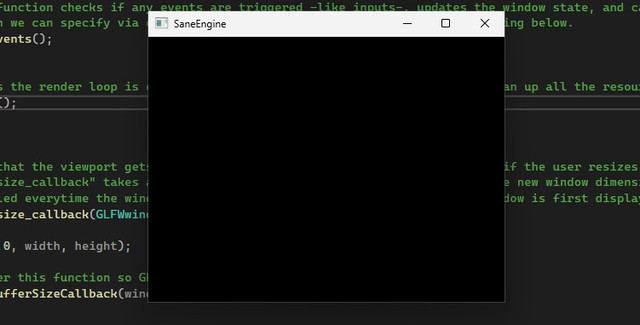
heres a little something ive been working on lately, i got sick of not being able to code in unreal engine because of my storage and memory problem so:
apart from this shit, ive got a lot of music to share soon maybe some artwork as well, idfk im a fkn mess
also i realize that im using visual studio as my IDE right now, which i fucking despise with all of my guts. i got no excuse i got fkn lazy to setup vscodium to work with c++
ive had my fair share of fights with IDEs and CPP. and they fucking won ok
ps: i forgot my fluxer account details lmao so that will take some time to recover and come back to the server
2026-03-25
see you in august
ill be going offline for a few months until i get my shit together, right now things are messed up.
ive got big shit coming, this is not the end
2026-03-14
fucking hell
i couldnt crack SHIT.
im retreating from cracking Mystery Case Files because this shit is way out of my league right now
so im going back to cracking crackmes. for now.
one day ill fucking get it.
im still working on IVVI from time to time, the updates are on my gitlab repo if you give a shit at all.
meanwhile im still learning.
ive made good progress with the game crack though, ive learned how to use code caves to open a calc.exe, even if i dont fully get it yet and cant write my custom shell code yet.
step by step im gonna fucking do it (hopefully)
2026-03-09
Big shit is coming soon
I might finally have made enough progress to crack an actual game from 2006:
Mystery Case Files: Ravenhearst
ill update soon
a lil update
motherfucker.
i cant do SHIT with this fucking game
its been three days and im losing hope, but theres so much to fucking lear man
i found some shit through CFF explorer called things like "HasProductBeenActivated" and "DecryptUnlockCode"
so im dealing with encryption, obfuscation, and anti-tamper measures.
MOTHERFUCKER I JUST BYPASSED A WINAPI DEBUG CHECK, NOT THIS
anyways, ill probably update more later, im learning PE architecture right now and what not. fucking hell.
2026-03-06
FUCK AI AAAAAAAAAAAAAAAAAAAAAAAAAAAAAAAAAAAAAAA
RIDER, CLION, QTC, VS, VSC EVERYTHING HAS AI SHOVED UP ITS FUCKING ASS HOLY SHIT
im so fucking done with it, that i tried switching to NEOVIM and tried to integrate it with unreal. BOY was i fucking retarded to even DARE
ive been trying to get it working for a whole fucking day, and im still getting header errors in nvim.
i went as low as ASKING A FUCKING AI to get it working and still i couldnt. but im not gonna switch to any IDEs yet, ill get this fuckass IDE working because its fucking personal now.
Clang, Clang++, MSVC, MSYS, UCRT, Mingw.
what the FUCK is even anything anymore. Its 5AM and im fucking done for today.
2026-03-02
blueprint release: lerp vector with arc
just a fuckass blueprint i made to stop using the normal lerp vector node in unreal which is absolute ass and only does things linearly.
its a pure function node so you just have to create one and paste this whole shit right inside it and you should be good. play with the arc height and do some shit idfk
DISCLAIMER:
if you see a video instead of the blueprint then one of your tracker blocking addons is blocking the site because it has a tracker
and i cant FUCKING manage to turn it off unless i host the whole fucking site myself.
the tracker is porbbaly called "static.cloudflareinsights.com" which is bullshit, it sounds like some telemetry shit that the blueprint sharing site uses.
so heres the link instead of the iframe bullshit:
2026-03-01
join the fluxer server
Fuck discord and their shitty policies, go open source alternative
2026-02-24
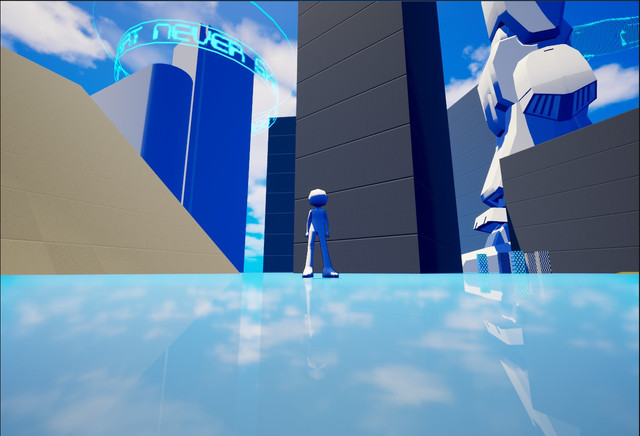
GAME DEMO RELEASE: IVVI-v0.1-DemoBuild
thats right.
i have released the very first demo of my game, the following is included:
- Locomotion + jump (WASD and space)
- Double jump (Double space)
- Wall running (just hug a wall mid air)
- off wall jumping (jump while wall running)
- ledge grabbing (almost reach a platform, itll automatically do it for you)
- DASHING (LSHIFT) [Handles slopes quite well, try it on that tilted building]
- [DEMO] an impact frame + screen shake + emitter spawning at hit location
(Just go to those gridded boxes on the side and press LMB, make sure your close to them)
- that big ass mecha leg has broken collisions so dont expect shit
and thats about it, the other things are all visual such as the giant whale in the sky rotating around a circle
or the various tech-y looking shit around the world.
Here you go with the link to the game and the repository:
have fun
The pass to the zip file is "123"
2026-02-19
tool release: strHunter
i just finished making a simple python script with no prior python knowledge (and no i wouldnt fucking use AI to make it because im not a fag).
more details on the gitlab site here
shit took me at least 6 hours to make the script and an extra 1 hour for the readme file on the repo
also heres the fucking code because why not
#   made by August831
#   next update will be focused on error handling

import subprocess
import fileinput

#   ask for phrase to search
strToFind = input("Enter the string you want to find:\n")
#   lower the case of the users input to ensure compatibility with the strings.exe result
loweredInput = strToFind.lower()

#   ask for file path
filePath = input("Enter full path of file or dir:\n")

#   feed the output of the strings.exe sysInternal program into a txt file called "output.txt"
with open("output.txt", "w") as f:
    stringsResult = subprocess.run(["strings.exe", "-nobanner", filePath], universal_newlines=True, capture_output=True, shell=True).stdout

    #   lower the result of strings.exe to ensure compatibility with the user input
    loweredResult = stringsResult.lower()
    print(loweredResult, file=f)

#   go through every line in the txt file and find the needed string in it then print the line containing the string
#   this will result in a lower case print of the found lines, but it works nontheless
for line in fileinput.input('output.txt'):
    if loweredInput in line:
        print(line)
also about that burnt out thing, i didnt say ill die and never do anything ever again, ill just post whenever i feel like it.
not like anyone can even see this or gives a shit anyways
oh yeah also...
crackme release: GTK-v0.1
go and see the description for yourself ffs, im not gonna say everything all over again,
and dont mind the username, i cant change it on that site
its a psuedo shit i used to do before locking on my current
heres the code to it, but DO NOT look at it before you crack the exe on crackmes.one
writing a shitty blog along with doing whatever the fuck is overwhelming
i can barely have the will to wake up let alone this shit
its taking more thinking power than there is available, and i wont be updating shit on here until i get the will to do so
im so fucking burnt out from everything since the beginning, tried to make a blog to have another reason to do something but it made it worse
this will probably be the last post for this year, maybe not idfk, either way nobody gives a shit
2026-02-15
new track: who will fix me now
listen to this fuckass track i made, yes i also make bad music along with the RE thing, i also do game development
i cant fucking focus on one thing, is that so bad?
since my browser is blocking embedded links automatically, i realized it sometimes doesnt show, so heres the damn
apparently firefox doesnt work with youtube embeds for some reasons, so if you can see the video your probably using chrome or something
which you fucking shouldnt.
FUCK chrome and the whole google ecosystem, they are bunch of corporate cunts trying to play god when all it takes is a single bullet to the CEO's head.
switch to librefox or at least firefox or just anything but chrome, and no opera doesnt fucking count because they are retarded on top of being conglomerate little shits.
A LITTLE UPDATE:
i changed the embed bs to a peertube instance, no more kike sites on my fucking site.
2026-02-11
piskaj crackme attempt
ive been trying to crack this fucking crackme for the longest time now, its been almost a month since im building myself to reach a level where i can bypass a single fucking check
That check is the so call "IsDebuggerPresent" check that i have been trying to replicate in my own crackme so i can RE it. but i couldnt get it to fucking work.
So here i am once again attempting this bullshit all over hoping ill be able to make it this time.
i will be posting here once i make progress.
meanwhile heres the link to the crackme if you wanna give it a try or see it for yourself.
the password to the zip is "crackmes.one"
UPDATE: I FUCKING DID IT
HOLY SHIT I DID IT
I wrote down my thoughts as i did it:
            THATS TOO MANY FUCKING ANTI DEBUG CHECKS BRO
im learning in real time on how to implement this shit

since it all calls the process termination bullshit, ill try patching that out somehow

i think i patched the warning message out? now it should just close
HOLY SHIT YES

lets try patching the process termination bulshit
OMG

I FUCKING BYPASSED THE DEBUG CHECK
im so fucking happy right now
ill try debugging it wiht x64dbg now and actually get into the cracking part

okok one quick recap:

1- we edited the manifest through "Resource Hacker" and changed admin privilidge requests to "asInvoker"
2- we NOP-ed out the MessageBoxA that was triggering the debug check or whatever
3- we patched out the process termination which was being called by every anti debugging measure
4- now we will get to the real cracking using a debugger


1 sec lemme see

fucking prick obfuscated this shit lmao
lmao worth the try

i could try patching the wrong key thing into the correct key, ill try that first, if i get it right
ill try to actually solve the conditions

NO FUCKING WAY
i know i said that ill try to actually solve the fucking crackme once i get the patching right, but fuck it for now
TWO WEEKS OF TRYING AND LEARNING DOG.
I did it.
Piskaj is no fucking more.
I did a crack me from scratch and tried to make a isdebuggerpresent check and remote debuger check in my own crack me,
learned how it all works, the arguments of the functions and all, and in the end there was a simple obfuscation where the "OK" when correct and "NO"
when the password is wrong was encrypted somehow,
I renamed them for calrity in ghidra and managed to replace the wrong key memory call to the address
of the OK result and now whatever you type in it results in a OK,
I finally managed to change the manifest to asInvoker through resource hacker and I patched out
(NOP) the MessageBoxA function and Terminate process functions so it wouldn't trigger the error and exit the crack me if the debugger is present, there was
like 7 anti debugging measures and I just understood the CheckRemoteDebuggerPresent and isDebuggerPresent methods, and the others were similar with the
end of the function always calling the same function which when I navigated to it I found the message box and terminate process methods there, so I
just NOP Ed them and bypassed the checks.
After weeks, finally.
2026-02-XX
Horizon Engine Script
finally got the fuckass script detection thing working with javascript, i just need to replace every bracket with the appropriate entity
This is the script that is used for the little effect your seeing at the top and bottom of the site.
                // Horizon Engine
<script>
    const roofElem = document.getElementById('roof');
    const floorElem = document.getElementById('floor');
    // Config (play with these numbers and strings and have some fun)
    const width = 208;
    const sideHeight = 12;
    const chars = " `.-':_,^=;><+!rc*/z?sLTv)J7(|Fi{C}fI31tlu[neoZ5Yxjya]2ESwqkP6h9d4VpOGbUAKXHm8RD#$Bg0MNWQ%&@";
    let frame = 0;

    function generateFrame(isRoof) {
        let output = "";
        const speed = 0.05; // horizon speed
        for (let y = 0; y < sideHeight; y++) {
            let row = "";
            const distToLogo = isRoof ? (sideHeight - y) : (y + 1);
            const z = 10 / distToLogo;
            const direction = isRoof ? 1 : -1; // dir inversion for roof and floor
            const offset = frame * speed * direction;
            for (let x = 0; x < width; x++) {
                const centeredX = (x - width / 2);
                const u = Math.floor((centeredX * z) + offset);
                const v = Math.floor(z * 1 + offset);
                row += chars[Math.abs(u + v) % chars.length];
            }
            output += row + "\n";
        }
        return output;
    }
    function animate() {
        roofElem.textContent = generateFrame(true);
        floorElem.textContent = generateFrame(false);
        frame++;
        requestAnimationFrame(animate);
    }
    animate();
</script>
2026-02-08
A831's Blog
This space needs automation via a highly customizable json files that could dynamically change the date without me manually doing it maybe
also automatically maybe make my code be compatible with html format like replacing the
< and > with the right entities and few more adjustements so i would have less headaches when i write a new blog entry
heres a little absolute dogshit of a crackme as a test for the code block below